Introduction
In today’s digital world, passwords are the first line of defense against cybercrime. Whether you are checking your email, managing your bank account, shopping online, or accessing social media, passwords protect your personal information from unauthorized access. Unfortunately, many people still use weak passwords or reuse the same password across multiple websites, making it easier for hackers to compromise their accounts.
Password security is no longer optional—it is essential. Every year, millions of user accounts are exposed through data breaches, phishing attacks, and password leaks. Cybercriminals use advanced tools capable of guessing thousands of passwords every second. Without proper password protection, sensitive information such as financial records, personal photos, business documents, and private conversations can fall into the wrong hands.
This comprehensive guide explains everything you need to know about password security. You will learn how passwords work, why they are important, common security threats, and the best practices for creating strong passwords. You’ll also discover how password managers, multi-factor authentication, passkeys, encryption, and modern authentication technologies help keep your accounts secure.
Whether you are a beginner, a business owner, an IT professional, or simply someone who wants better online security, this guide will provide practical advice that you can apply immediately.
What Is Password Security?
Password security refers to the methods, technologies, and best practices used to protect passwords from theft, misuse, and unauthorized access. A secure password acts as a digital key that verifies your identity before allowing access to an online account or device.
Good password security involves more than simply choosing a long password. It includes:
- Creating unique passwords for every account.
- Storing passwords safely.
- Changing compromised passwords immediately.
- Using password managers.
- Enabling multi-factor authentication.
- Avoiding phishing scams.
- Monitoring accounts for suspicious activity.
When these practices are combined, they significantly reduce the risk of cyberattacks.
Why Password Security Matters
Every online account contains valuable information. Hackers target accounts because they often contain:
- Personal information
- Banking details
- Credit card information
- Business documents
- Medical records
- Private conversations
- Photos and videos
A compromised password can lead to:
- Identity theft
- Financial fraud
- Data loss
- Reputation damage
- Business disruption
- Account takeovers
Strong password security dramatically reduces these risks.
The Evolution of Passwords
Passwords have been used in computing for decades. Early computer systems relied on simple text-based passwords because there were relatively few users and limited internet connectivity.
As technology advanced, cyber threats became more sophisticated. Today, organizations use advanced security measures including:
- Password hashing
- Encryption
- Multi-factor authentication
- Biometrics
- Passkeys
- Zero-trust security models
Despite these advancements, passwords remain one of the most widely used authentication methods.
How Passwords Work
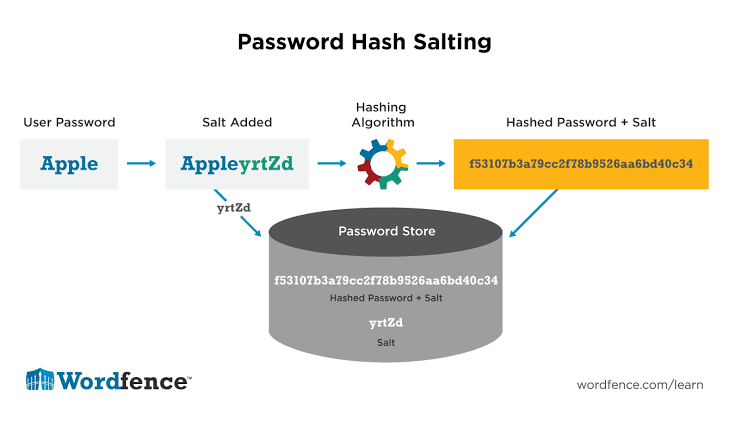
Whenever you create an online account, the website should not store your password in plain text. Instead, modern systems use cryptographic hashing algorithms.
The process generally works like this:
- You create a password.
- The server converts it into a unique hash.
- The hash is stored securely.
- During login, your entered password is hashed again.
- If the hashes match, access is granted.
This approach helps protect passwords even if a database is compromised.
Common Password Security Threats
Brute Force Attacks
Attackers use automated software to try millions of password combinations until they find the correct one.
Weak passwords such as “123456” or “password” can often be cracked within seconds.
Dictionary Attacks
Instead of testing every possible combination, attackers use dictionaries containing common passwords and phrases.
Examples include:
- password
- qwerty
- football
- welcome123
These passwords provide very little protection.
Credential Stuffing
Credential stuffing occurs when attackers use usernames and passwords leaked from one website to access accounts on other websites.
If you reuse passwords, a single data breach can compromise many of your accounts.
Phishing
Phishing attacks trick users into entering passwords on fake websites that appear legitimate.
Always verify website URLs before entering login credentials.
Malware
Keyloggers and spyware secretly record everything typed on your keyboard, including passwords.
Keeping your operating system and antivirus software updated helps reduce this risk.
Social Engineering
Rather than hacking computers, attackers manipulate people into revealing passwords.
Examples include:
- Fake technical support calls
- Fraudulent emails
- SMS scams
- Fake login pages
Always verify requests for sensitive information before responding.
Characteristics of a Strong Password
A secure password should include:
- At least 16 characters
- Uppercase letters
- Lowercase letters
- Numbers
- Special characters
- No personal information
- No dictionary words
- Unique for every account
Example:
F7!river$Cloud92#Orange*Moon
Long, random passwords are much harder to crack than short, predictable ones.
Password Best Practices
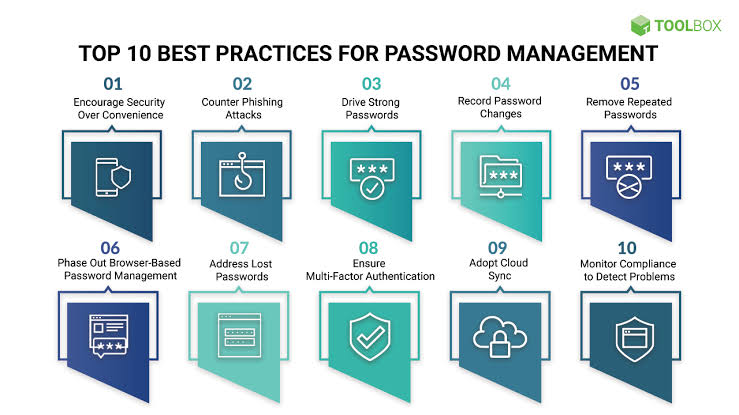
To improve your password security:
- Never reuse passwords.
- Use a password manager.
- Enable multi-factor authentication.
- Monitor accounts regularly.
- Change compromised passwords immediately.
- Avoid sharing passwords.
- Keep software updated.
- Beware of phishing attacks.
- Review your security settings periodically.
Frequently Asked Questions (FAQs) About Password Security
1. What is password security?
Password security refers to the practices and technologies used to protect passwords from unauthorized access, theft, and misuse. It includes creating strong passwords, using password managers, enabling multi-factor authentication, and following safe online security habits.
2. Why is password security important?
Password security is important because passwords protect sensitive information such as personal data, financial accounts, emails, and business records. A weak password can allow hackers to access your accounts and cause identity theft, financial loss, or privacy problems.
3. What makes a password strong?
A strong password is long, unique, and difficult to guess. It should contain a combination of uppercase letters, lowercase letters, numbers, and special characters. A password should also avoid common words, personal details, and predictable patterns.
4. How long should a secure password be?
Security experts generally recommend using passwords that are at least 12 to 16 characters long. Longer passwords are usually more secure because they create more possible combinations for attackers to guess.
5. Is using the same password for multiple accounts safe?
No, using the same password for multiple accounts is risky. If one website experiences a data breach, hackers may use the stolen password to access your other accounts. Always use a unique password for every important account.
6. What is a password manager?
A password manager is a tool that securely stores and manages your passwords. It can generate strong passwords, remember login details, and protect your accounts with encryption so you do not have to memorize every password.
7. Are password managers safe?
Yes, reputable password managers use strong encryption and security features to protect stored passwords. Using a trusted password manager is generally safer than saving passwords in browsers, notes, or using simple passwords that are easy to remember.
8. What is multi-factor authentication (MFA)?
Multi-factor authentication adds an extra layer of security by requiring two or more verification methods before granting access. These methods may include a password, security code, fingerprint, or authentication app approval.
9. How do hackers steal passwords?
Hackers steal passwords through methods such as phishing attacks, malware, brute force attacks, credential stuffing, and data breaches. Using strong passwords and security practices can significantly reduce these risks.
10. Should passwords be changed regularly?
Changing passwords regularly is helpful, especially when there is evidence of a security breach. However, using strong, unique passwords and enabling multi-factor authentication is often more important than frequently changing secure passwords without a reason.
11. What should I do if my password is stolen?
If you believe your password has been stolen:
- Change the password immediately.
- Enable multi-factor authentication.
- Check your account activity for suspicious actions.
- Update the password anywhere it was reused.
- Contact the service provider if necessary.
12. What are passkeys, and are they better than passwords?
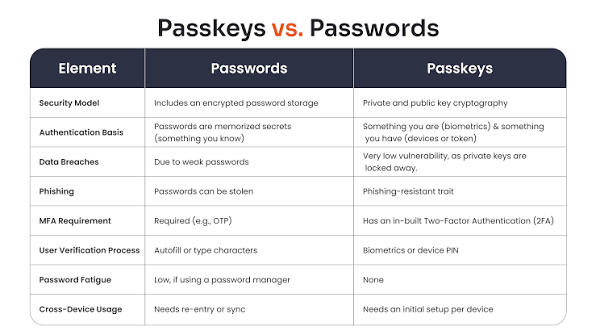
Passkeys are a newer authentication method designed to replace traditional passwords. They use cryptographic technology and devices such as smartphones or security keys to verify identity. Passkeys can provide stronger protection against phishing attacks.
Conclusion: The Importance of Strong Password Security
Password security is one of the most important parts of protecting your digital identity. As cyber threats continue to grow, relying on simple or reused passwords can put personal and professional information at risk.
A strong password strategy involves creating unique and complex passwords, using a reliable password manager, enabling multi-factor authentication, and staying aware of common cyber threats. Small security improvements can make a significant difference in protecting your online accounts.
In the future, authentication methods such as passkeys and biometric verification may reduce dependence on traditional passwords. However, passwords will continue to play an important role in digital security for many years.
By following proper password security practices, individuals and businesses can reduce the chances of unauthorized access, protect sensitive information, and create a safer online environment.
Remember, your password is the key to your digital life. Protecting it is one of the simplest and most effective steps you can take toward better cybersecurity.