
Cybersecurity has become one of the fastest-growing fields in the digital world. As businesses, governments, and individuals rely more on technology, protecting digital assets from cyber threats is more important than ever. Ethical hacking, also known as penetration testing, plays a critical role in identifying vulnerabilities before cybercriminals can exploit them.
For beginners entering cybersecurity, learning to use ethical cybersecurity tools is one of the first and most important steps. These tools help security professionals scan networks, identify weaknesses, analyze traffic, perform password audits, and test system security—all while operating legally and ethically.
In this guide, you’ll discover the top ethical cybersecurity tools for beginners, their features, benefits, and how they can help you build a strong foundation in cybersecurity.
What Are Ethical Cybersecurity Tools?
Ethical cybersecurity tools are software applications designed to identify, analyze, and fix security vulnerabilities in computer systems, networks, websites, and applications. Unlike malicious hacking tools, these programs are intended for legal security testing with proper authorization.
Ethical hackers use these tools to:
- Detect security weaknesses
- Perform vulnerability assessments
- Analyze network traffic
- Monitor systems
- Test web applications
- Audit passwords
- Improve overall cybersecurity posture
These tools are widely used by penetration testers, security analysts, network administrators, students, and cybersecurity professionals.
Why Beginners Should Learn Cybersecurity Tools
Learning cybersecurity isn’t just about understanding theory. Practical experience with industry-standard tools helps beginners develop real-world skills that employers value.
Some key benefits include:
- Understanding how cyber attacks work
- Learning defensive security techniques
- Building hands-on experience
- Preparing for cybersecurity certifications
- Creating personal lab environments
- Improving problem-solving skills
- Developing ethical hacking knowledge
Many professional certifications such as CompTIA Security+, CEH, and OSCP require familiarity with popular cybersecurity tools.
1. Nmap – The Best Network Scanning Tool
What is Nmap?
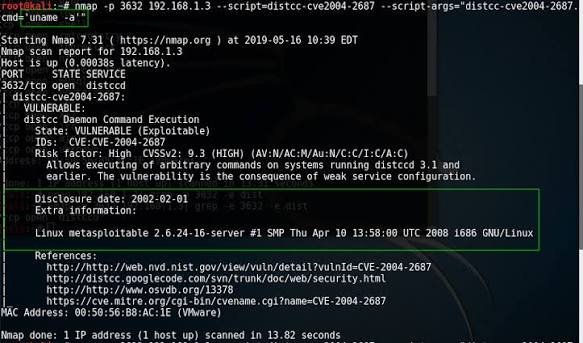
Nmap (Network Mapper) is one of the most widely used cybersecurity tools worldwide. It helps ethical hackers discover devices connected to a network, identify open ports, detect operating systems, and discover running services.
Because of its simplicity and extensive documentation, Nmap is an excellent starting point for beginners.
Key Features
- Network discovery
- Port scanning
- Service detection
- Operating system fingerprinting
- Firewall detection
- Network inventory
- Scriptable automation using NSE
Why Beginners Love Nmap
Nmap provides instant insight into how networks communicate. Instead of guessing which services are running, beginners can quickly identify exposed systems and learn how attackers gather reconnaissance information.
Common Use Cases
- Discovering devices on a network
- Finding open ports
- Identifying vulnerable services
- Mapping enterprise networks
- Initial penetration testing
Pros
- Free and open-source
- Cross-platform support
- Large community
- Beginner-friendly documentation
- Powerful scripting engine
Cons
- Command-line interface can seem intimidating initially
- Advanced scanning requires practice
2. Wireshark – The Ultimate Network Traffic Analyzer
What is Wireshark?
Wireshark is the world’s most popular packet analyzer. It captures and analyzes network traffic in real time, allowing users to inspect every packet transmitted across a network.
Learning Wireshark helps beginners understand how devices communicate over the internet.
Key Features
- Live packet capture
- Deep packet inspection
- Protocol analysis
- Traffic filtering
- Network troubleshooting
- Export packet data
- Graphical interface
Why Beginners Should Learn Wireshark
Cybersecurity professionals spend a significant amount of time analyzing network traffic. Wireshark provides a visual representation of data flowing through networks, making it easier to understand protocols such as:
- HTTP
- HTTPS
- DNS
- FTP
- SSH
- TCP
- UDP
- ICMP
Common Use Cases
- Investigating suspicious traffic
- Malware analysis
- Network troubleshooting
- Performance monitoring
- Learning networking concepts
Pros
- Free
- Easy graphical interface
- Industry standard
- Extensive protocol support
Cons
- Can overwhelm beginners due to large amounts of captured data
3. Metasploit Framework – Learn Penetration Testing
What is Metasploit?
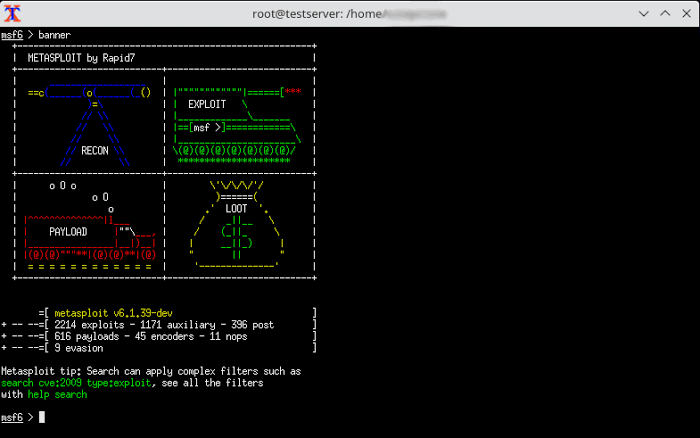
Metasploit Framework is one of the most powerful penetration testing platforms available. It helps ethical hackers identify, validate, and demonstrate vulnerabilities in a controlled environment.
Although it offers advanced capabilities, beginners can start by learning basic modules and using it in safe lab environments.
Key Features
- Vulnerability exploitation
- Payload generation
- Security testing
- Post-exploitation modules
- Auxiliary scanners
- Automation support
Why Beginners Should Use Metasploit
Metasploit helps users understand how vulnerabilities are exploited after they are discovered. This practical perspective deepens knowledge of both offensive and defensive security.
Common Use Cases
- Testing vulnerable machines
- Security demonstrations
- Exploit validation
- Learning penetration testing
- Lab practice
Pros
- Free Community Edition
- Huge exploit database
- Excellent documentation
- Active community
Cons
- Requires understanding of networking
- Should only be used in authorized environments
4. Burp Suite Community Edition – Web Application Security Testing
What is Burp Suite?
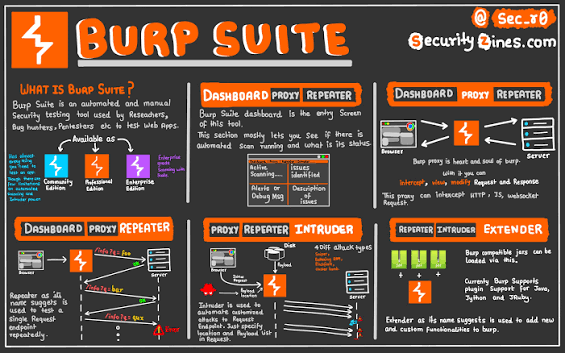
Burp Suite is one of the most trusted tools for testing web application security. It acts as an intercepting proxy between a browser and a web application, allowing ethical hackers to inspect and modify requests.
The Community Edition is free and ideal for beginners learning web security.
Key Features
- Intercept HTTP requests
- Modify responses
- Manual vulnerability testing
- Web request analysis
- Repeater tool
- Intruder (limited in Community Edition)
Why Beginners Should Learn Burp Suite
Modern organizations rely heavily on web applications. Learning Burp Suite helps beginners understand common web vulnerabilities, including:
- SQL Injection
- Cross-Site Scripting (XSS)
- Authentication flaws
- Session management issues
- Insecure cookies
Common Use Cases
- Website security testing
- API testing
- Manual penetration testing
- Bug bounty practice
- Learning OWASP Top 10 vulnerabilities
Pros
- Free version available
- Beginner-friendly interface
- Industry standard
- Excellent learning resources
Cons
- Some advanced automation features require the Professional Edition
5. Kali Linux – The Ultimate Ethical Hacking Operating System
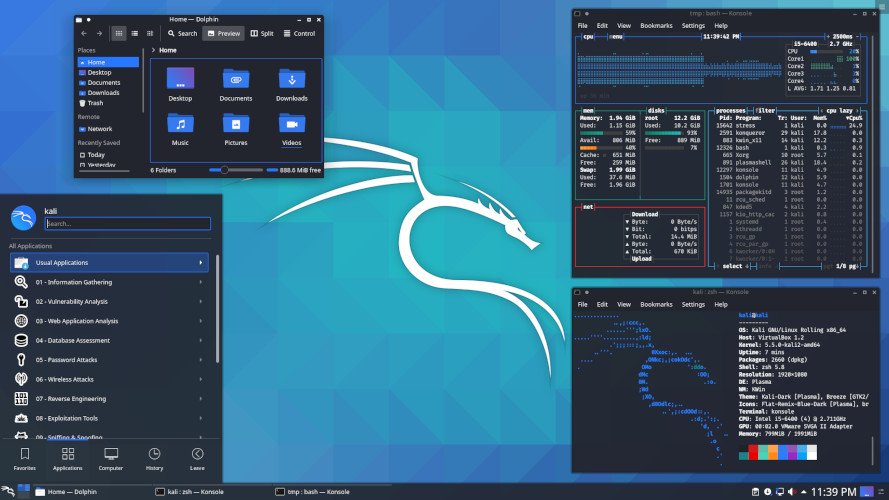
What is Kali Linux?
Kali Linux is a Debian-based operating system specifically designed for cybersecurity professionals, penetration testers, and ethical hackers. It comes pre-installed with hundreds of security tools, making it one of the most popular platforms for learning ethical hacking.
Instead of installing tools individually, beginners can access a complete cybersecurity toolkit in a single operating system.
Key Features
- Hundreds of pre-installed security tools
- Regular updates
- Open-source
- Customizable environment
- Live boot support
- Virtual machine compatibility
Why Beginners Should Learn Kali Linux
Kali Linux provides a practical environment where beginners can experiment with various ethical hacking tools without configuring each one from scratch. It also introduces users to Linux, an essential skill for many cybersecurity roles.
Common Use Cases
- Penetration testing labs
- Vulnerability assessments
- Digital forensics
- Wireless security testing
- Capture the Flag (CTF) challenges
Pros
- Free and open-source
- Comprehensive security toolkit
- Strong community support
- Widely used in professional environments
Cons
- Requires basic Linux knowledge
- Not intended for everyday personal computing
6. John the Ripper – Password Security Auditing
What is John the Ripper?
John the Ripper is a well-known password auditing and recovery tool used by cybersecurity professionals to evaluate password strength. Rather than targeting systems illegally, ethical hackers use it in authorized environments to identify weak passwords so organizations can strengthen their security.
For beginners, John the Ripper offers valuable insight into the importance of strong password policies and authentication practices.
Key Features
- Password hash analysis
- Support for multiple hash formats
- Dictionary-based password auditing
- Customizable rule sets
- Cross-platform compatibility
- Open-source version available
Why Beginners Should Learn John the Ripper
Weak passwords remain one of the most common causes of security incidents. Learning how password auditing tools work helps beginners understand password security, authentication mechanisms, and the importance of using strong, unique credentials.
Common Use Cases
- Password strength assessments
- Security audits
- User awareness training
- Learning authentication concepts
- Testing password policies in lab environments
Pros
- Free and open-source
- Supports numerous password hash formats
- Large community and documentation
- Lightweight and efficient
Cons
- Command-line interface may require practice
- Should only be used with proper authorization
7. Nikto – Web Server Vulnerability Scanner
What is Nikto?
Nikto is an open-source web server scanner that checks websites for common security issues, outdated software, insecure configurations, and known vulnerabilities. It provides a quick overview of potential weaknesses that administrators can investigate further.
Key Features
- Web server scanning
- Detection of outdated software
- Identification of insecure configurations
- SSL and HTTPS checks
- Extensive vulnerability database
- Detailed scan reports
Why Beginners Should Learn Nikto
Nikto introduces beginners to the basics of web server security and helps them understand how misconfigurations can expose systems to unnecessary risk.
Common Use Cases
- Website security assessments
- Server configuration reviews
- Vulnerability identification
- Learning web security concepts
Pros
- Free and open-source
- Easy to use
- Fast scanning
- Regularly updated vulnerability database
Cons
- Generates many informational findings that require interpretation
- Does not confirm whether every finding is exploitable
8. OWASP ZAP – Beginner-Friendly Web Security Testing
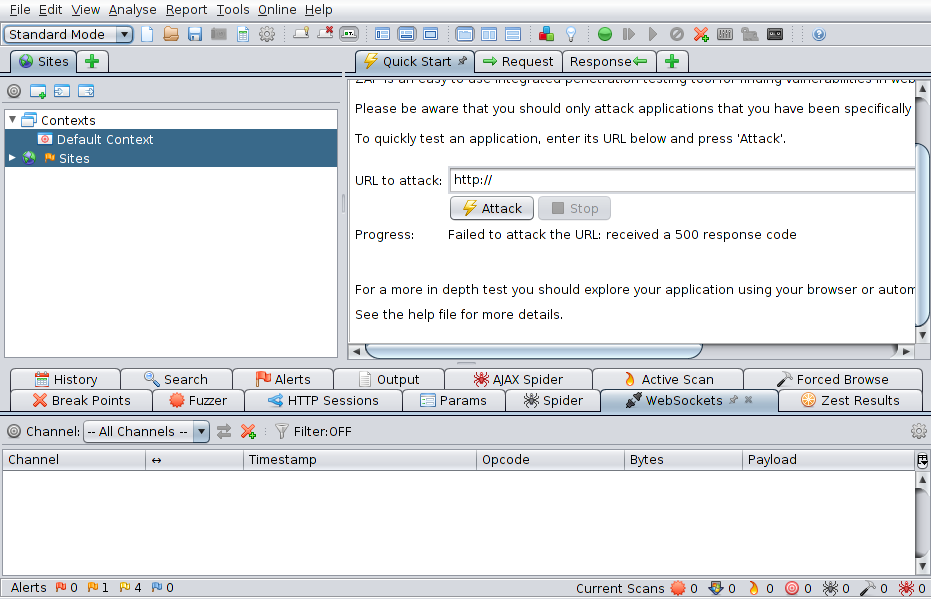
What is OWASP ZAP?
OWASP Zed Attack Proxy (ZAP) is a free, open-source web application security testing tool developed by the Open Worldwide Application Security Project (OWASP). It is designed for developers, testers, and security professionals to identify common web application vulnerabilities.
Key Features
- Intercepting proxy
- Automated vulnerability scanning
- Passive security analysis
- Manual testing tools
- API testing support
- User-friendly interface
Why Beginners Should Learn OWASP ZAP
OWASP ZAP is one of the easiest web security tools for newcomers. It combines automated scanning with manual testing, allowing beginners to understand how web applications function while identifying common security weaknesses.
Common Use Cases
- Web application assessments
- API security testing
- Secure software development
- Educational labs
- Learning the OWASP Top 10
Pros
- Completely free
- Beginner-friendly interface
- Active community
- Frequent updates
Cons
- Large applications may require more advanced configuration
- Automated scans should be complemented with manual testing
9. OpenVAS (Greenbone) – Vulnerability Assessment
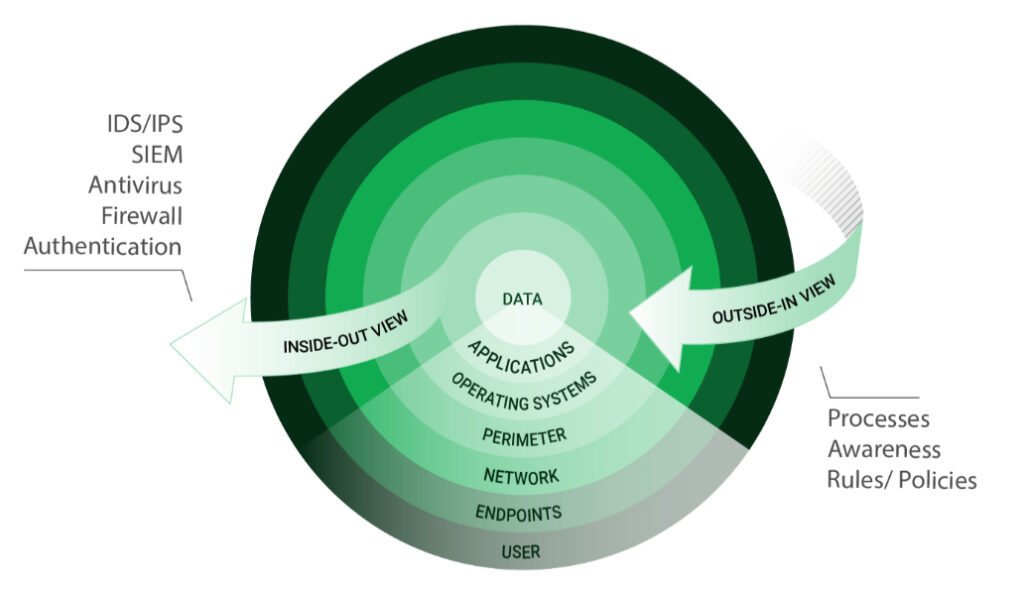
What is OpenVAS?
OpenVAS, maintained by Greenbone, is a comprehensive vulnerability assessment tool that scans systems for known security issues and provides detailed reports with remediation recommendations.
Key Features
- Comprehensive vulnerability scanning
- Regular vulnerability database updates
- Detailed reporting
- Scheduling capabilities
- Risk prioritization
- Network security assessments
Why Beginners Should Learn OpenVAS
OpenVAS helps beginners understand how organizations identify and prioritize vulnerabilities across their infrastructure. It also introduces the concept of vulnerability management as part of a broader cybersecurity program.
Common Use Cases
- Network vulnerability assessments
- Security compliance checks
- Risk analysis
- Internal security audits
Pros
- Free and open-source
- Extensive vulnerability database
- Detailed reports
- Enterprise-level capabilities
Cons
- Initial setup can take time
- Full scans may require significant system resources
10. Autopsy – Digital Forensics for Beginners
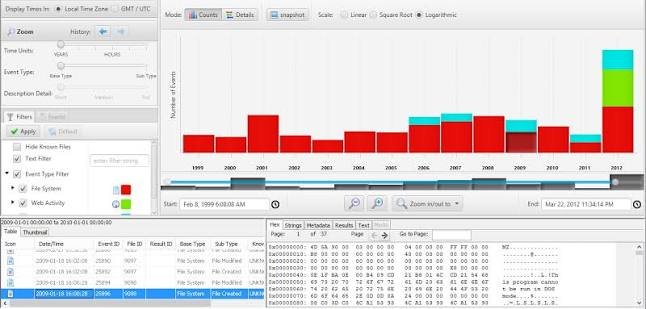
What is Autopsy?
Autopsy is an open-source digital forensics platform used to investigate storage devices and recover digital evidence. It provides a graphical interface that simplifies forensic analysis for beginners.
Key Features
- File recovery
- Timeline analysis
- Keyword searching
- Browser history analysis
- Email investigation
- Case management
Why Beginners Should Learn Autopsy
Digital forensics is an important branch of cybersecurity. Autopsy allows beginners to understand how investigators analyze compromised systems, recover deleted files, and examine digital evidence while following proper forensic procedures.
Common Use Cases
- Incident investigations
- Malware analysis
- File recovery
- Digital evidence collection
- Educational forensic labs
Pros
- Free and open-source
- Easy graphical interface
- Strong documentation
- Suitable for beginners
Cons
- Large investigations can be resource-intensive
- Advanced forensic techniques require additional training
Best Practices for Using Ethical Cybersecurity Tools
As you begin working with cybersecurity tools, it’s important to follow responsible and ethical practices.
- Only perform testing on systems you own or have explicit permission to assess.
- Build a virtual lab using platforms like VirtualBox or VMware to practice safely.
- Keep your tools updated to benefit from the latest security improvements.
- Document your findings and learn how to interpret scan results.
- Focus on understanding how vulnerabilities work rather than simply running automated scans.
- Continue learning through Capture the Flag (CTF) challenges and cybersecurity training platforms.
Final Thoughts
Mastering cybersecurity tools is an essential step toward building a successful career in information security. Tools such as Nmap, Wireshark, Metasploit, Burp Suite, Kali Linux, John the Ripper, Nikto, OWASP ZAP, OpenVAS, and Autopsy provide practical experience across network security, web application testing, vulnerability assessment, password auditing, and digital forensics.
For beginners, the goal should not be to learn every tool at once but to understand the purpose of each and practice using them responsibly in authorized environments. With consistent hands-on experience and a commitment to ethical conduct, you’ll develop the practical skills needed for certifications, cybersecurity jobs, and long-term success in the field.